
Published
Last updated
Virtual body doubling means working alongside another person remotely while each of you tackles a task. For a 25-minute session, spend two minutes naming an outcome, twenty working quietly and three checking what changed. WebToolBase’s free focus timer works alongside your own call or chat, with no account or camera needed for the timer.

How does virtual body doubling work for ADHD?
Picture a folder of receipts you have opened three times and sorted zero times. At 7 p.m., a friend joins a voice call to fold laundry. You each say what you plan to finish, mute the call and start. Twenty minutes later, your friend has a stack of towels and you know which receipts still need attention. Each person did their own work, with a shared appointment and finish time.
The practice takes several forms. In a survey of 220 people, researchers Tessa Eagle, Leya Breanna Baltaxe-Admony and Kathryn E. Ringland documented body doubling for tasks ranging from studying to washing dishes. The authors describe using the presence of others “to start, stay focused on, or accomplish a task.” That survey tells us how people use the practice and what they find helpful. It cannot measure how many more tasks someone will finish with a partner. Read the study in ACM Transactions on Accessible Computing.
An appointment can help with starting. A quiet partner can make a long task feel less solitary. A finish time can make it easier to stop. If being visible makes you self-conscious or conversation pulls you away from the work, shorten the social part first. One check-in at each end can be enough to try the idea.
Which body doubling option fits your budget and privacy needs?
Choose based on what you need to supply yourself. A timer adds structure to a session you arrange. Matching services provide another person, and a hosted group provides a facilitator and schedule. Use the table to compare who joins you, what it costs and what you need to share.
| Option | Cost | Who joins | Camera and privacy |
|---|---|---|---|
| WebToolBase focus timer | Free | Solo or bring your own partner | No camera, microphone or timer account. Use a separate call or chat if you want one. |
| Focusmate | 3 sessions per week free. Plus is $12 monthly or $8 per month billed annually. | Matched one-to-one sessions of 25, 50 or 75 minutes | Account and camera required. Focusmate says sessions are not recorded. |
| Flow Club | Free trial. $40 monthly or $400 annually. | Hosted group coworking | Account required. Camera encouraged, with camera-off allowed. Flow Club says it does not record or store session audio or video. |
| Pomodoro Technique with an offline timer | Free with a timer you already own | Solo work blocks, scheduled breaks and reflection | No account, camera or call for the offline setup. |
| Bring-your-own voice call or live text chat | No added cost if you already have access | Pair with a friend or colleague | Camera optional by agreement. The call or chat provider’s privacy settings apply. |
Already have someone to work with? Use your usual call or text chat and start the countdown at an agreed time. If finding a partner is the barrier and video feels comfortable, look at one-to-one matching. The hosted format makes sense if you prefer someone else to open and close the session. A solo interval is easy to start immediately when other people are busy.
How do you run a 25-minute session with a partner?
Protect the working minutes by deciding what counts as finished before opening the folder. “Do my expenses” can expand into logging six months of purchases. “Log the date and amount from the six receipts marked April” gives you a stopping point. Put the folder where you can open it, and save questions for the final check-in.
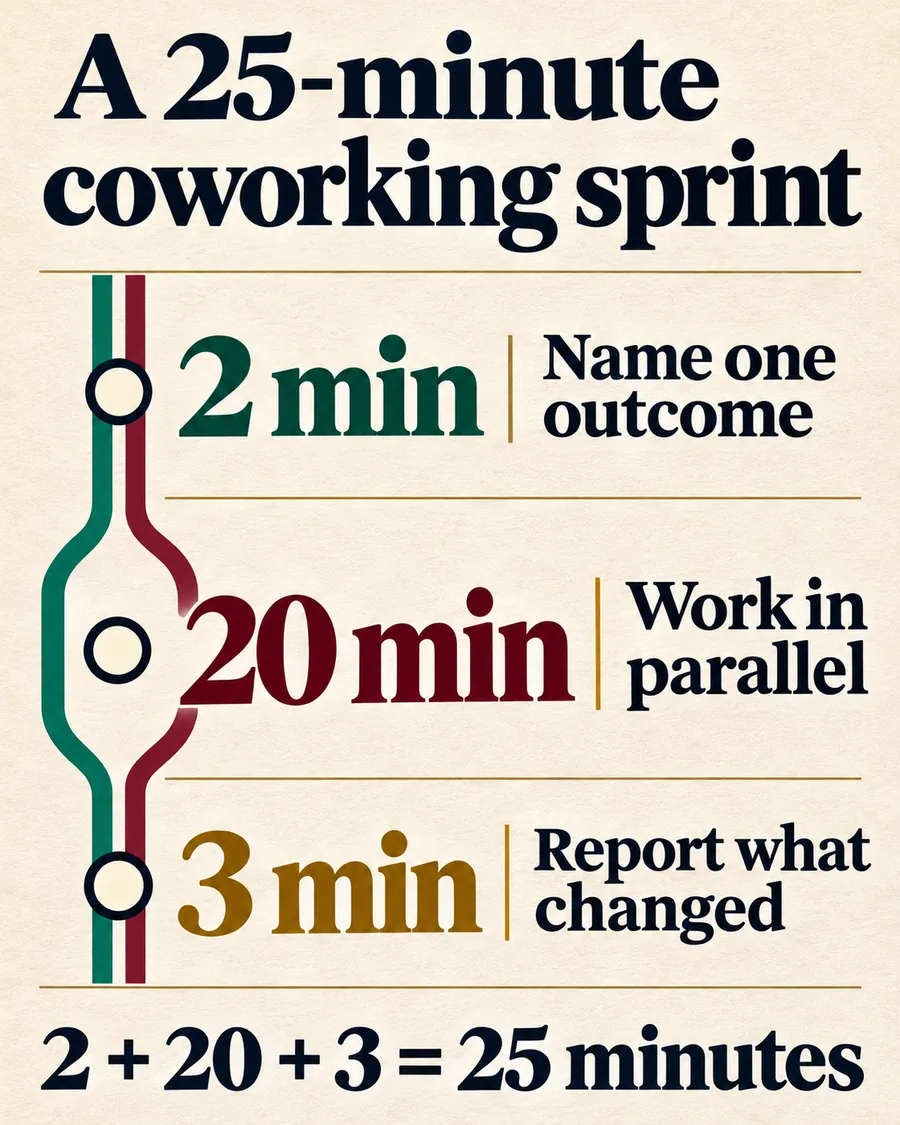
| Time | What each person does | Worked example |
|---|---|---|
| 0:00 to 2:00 | Share one outcome. | Avery will log six April receipts. Jordan will annotate two pages. |
| 2:00 to 22:00 | Mute and work in parallel. | Avery logs four receipts and sets aside two with missing details. Jordan marks both pages. |
| 22:00 to 25:00 | Report the result and write the next step. | Avery writes “Find two confirmation emails.” Jordan notes where to start tomorrow. |
At the 22-minute mark, Avery still has two receipts left. The useful result is knowing exactly which records need attention and why. Spending the closing minutes hunting for the missing emails could turn a short session into open-ended work. Keeping the agreed stop time makes the next appointment easier to schedule.
When choosing an outcome takes more than a minute, the Executive Dysfunction Starter can narrow it to a physical first step. If the sprint has to fit between meetings or errands, put it into the 3-3-3 Method Planner with time to switch tasks. You can also keep an ongoing sprint record in a digital planner from the WebToolBase Shop.
What if your partner is late, the camera is distracting or 25 minutes feels too long?
Agree on a short late-arrival window, such as three minutes. If no one joins, switch to a 10-minute solo round and begin the smallest part. If the partner comes in after you start, send the planned finish time in chat and keep the interval you already started. A shared finish time matters more than matching clocks to the second.
During sensitive work, say “personal admin” or “review three items” and keep screen sharing off. Work with headphones or use text only if sound or live video feels intrusive. Put both check-ins into the agreement. Camera-off can still feel social when each person knows the other is there and will return at the end.
Try a short round when the task is already uncomfortable. For longer work, a 50-minute round may make sense if you need time to get oriented, but agree on a break before scheduling a second one. The tool keeps your countdown and completed-sprint count in the current tab. If you need a reliable signal while the device is asleep, set a separate device alarm.
How can you tell if body doubling helps you?
Measure the part you want to improve. If getting started is the problem, record the minutes between the planned start and the first real action. If finishing is the problem, count comparable units, such as receipts entered or pages marked. Write down how much effort the session felt like on a simple one-to-five scale.
Over a week, try two solo sessions and two partner sessions with the same duration and a similar kind of work. A quicker start with equal output still tells you something useful. If you start faster but find each call exhausting, try a quieter partner, a text check-in or a single weekly appointment for the task you put off most. Four sessions can guide your routine. They are too few to draw a wider conclusion.
Frequently asked questions about body doubling
Can I body double on a phone without video?
Yes. Agree on a start time with a partner, use a voice call or live chat, and set a timer. Each of you can keep your camera off.
Is 25 minutes the right length for every task?
Choose a length that fits the first step and the time both people have. Try 10 minutes to get moving or 50 minutes for work that needs more setup.
Can a countdown replace a body double?
A countdown sets a stop time. A live partner adds someone to start and check in with. Try a solo sprint if you are waiting for a partner.
Is body doubling a treatment for ADHD?
Body doubling is a practical support some people use for everyday tasks. Existing studies do not establish a treatment effect or a dependable improvement in task completion.