
Published
Last updated
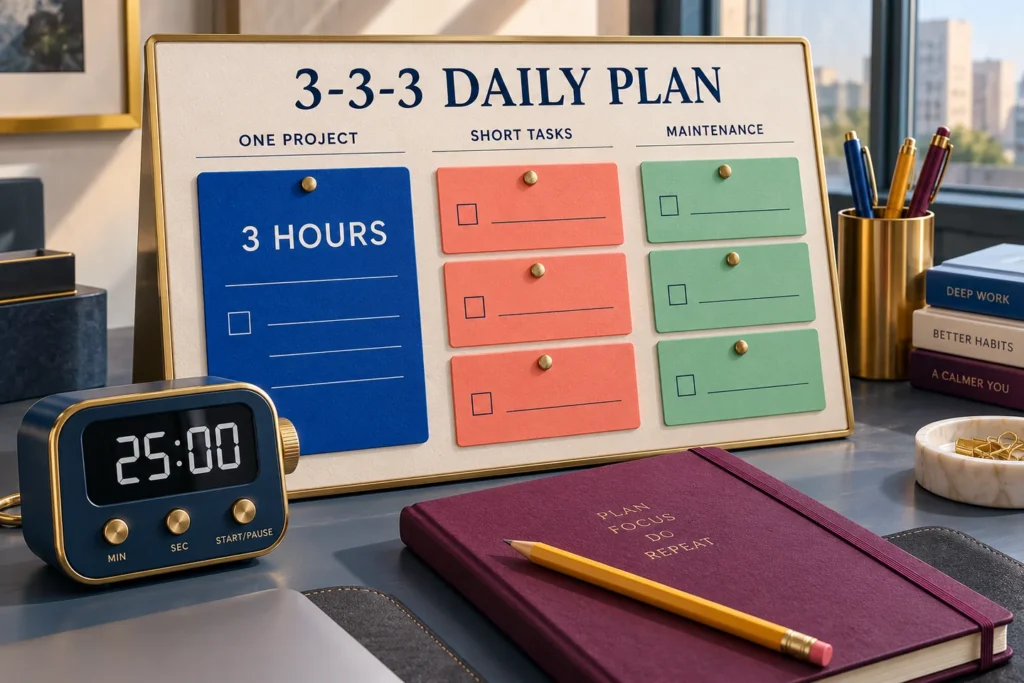
A to-do list can hold twenty reasonable tasks and still describe an impossible day. The proposal needs quiet work, the invoice needs sending, lunch needs making, and every item seems to belong near the top. The 3-3-3 productivity method gives those different kinds of work separate places so you can choose a day that has a chance of fitting.
The 3-3-3 method means three hours on one important project, three shorter tasks, and three maintenance activities. The first number measures time; the other two count activities. It does not mean three major priorities, three hours of uninterrupted concentration, or a nine-hour schedule.
Try the free 3-3-3 method planner and focus timer while reading. It lets you name a finish line, estimate the whole day, see an over-capacity warning, and download your plan. You can shorten the project allocation rather than forcing a three-hour target into a day that cannot support it.
Where the 3-3-3 method comes from
Oliver Burkeman described the approach in an issue of his newsletter, The Imperfectionist: 3/3/3, a method for structuring the day. Its useful distinction is between advancing something important, closing a few smaller obligations, and attending to the recurring work that keeps daily life functioning. Those categories make a limited plan easier to see.
What follows is a practical adaptation with original examples. The time arithmetic, shorter-day versions, and review questions are WebToolBase planning suggestions, not a validated treatment protocol or a promise of better performance. Three hours is a planning choice, not a universal biological limit or a requirement for a worthwhile day.
Give each of the three parts a clear job
One important project: choose an outcome you can recognize
Start with the project that would otherwise keep getting postponed behind smaller requests. Then decide what progress would look like today. “Work on the proposal” gives you no useful stopping point. “Draft the three-section outline and check the cost table” produces something you can inspect when the session ends.
A large project may contain several actions without becoming several priorities. Opening the reference file, outlining a section, checking a figure, and writing a short handoff can all serve the same proposal. Switching from the proposal to a website redesign and then to a tax return changes projects and adds setup costs. Keep the focus allocation attached to one outcome where possible.
Three hours of project work also needs room around it. You might use three separate work periods with breaks between them. Enter the work minutes in the project field and account for the breaks and transitions elsewhere. If only forty minutes are available, choose a forty-minute slice with a smaller finish line. A realistic adaptation is more useful than an impressive allocation you cannot begin.
Three shorter tasks: close a few bounded obligations
Look for actions with a visible end: send the prepared invoice, confirm an appointment, or review tomorrow’s calendar. A vague category such as “admin” can absorb the afternoon. Name the specific transaction, document, or decision you intend to finish, and estimate its whole duration.
Some obligations will be too large for this section. A client meeting that lasts ninety minutes is still ninety minutes even if you write it on one line. Either reserve it as a fixed appointment before calculating available time, or include its full duration in the plan. Do not count it in both places. Where a task depends on somebody else, define your own completion point, such as sending the question rather than receiving the answer.
Three maintenance activities: keep recurring needs visible
Food preparation, a short inbox triage, and clearing the work surface are examples of maintenance. These activities may not move a major project forward, but ignoring them can make tomorrow harder. Choose what your circumstances require instead of treating maintenance as a reward for finishing paid work.
The boundary between a short task and maintenance is less important than avoiding double counting. If inbox triage appears in maintenance, do not also hide it inside a thirty-minute admin task. Equally, personal care and accessibility needs do not have to fit inside three slots. Add their actual time to your day, reduce the optional work, and use a different planning format when this one becomes restrictive.
Build the plan from available time, not from the wish list
Before assigning tasks, subtract fixed commitments from the window you are planning. Suppose you have an eight-hour window with two hours already committed to appointments. That leaves six hours, or 360 minutes. Travel, setup, recovery time, meals, and transitions still have to be represented somewhere. Do not assume the gaps will cover them automatically.
Use this check: project work + shorter tasks + maintenance + breaks and transitions = planned minutes. Subtract planned minutes from available minutes to find the unassigned buffer. A negative answer means the plan exceeds the time entered. A positive answer leaves room for variation, but it cannot guarantee that your estimates are accurate.
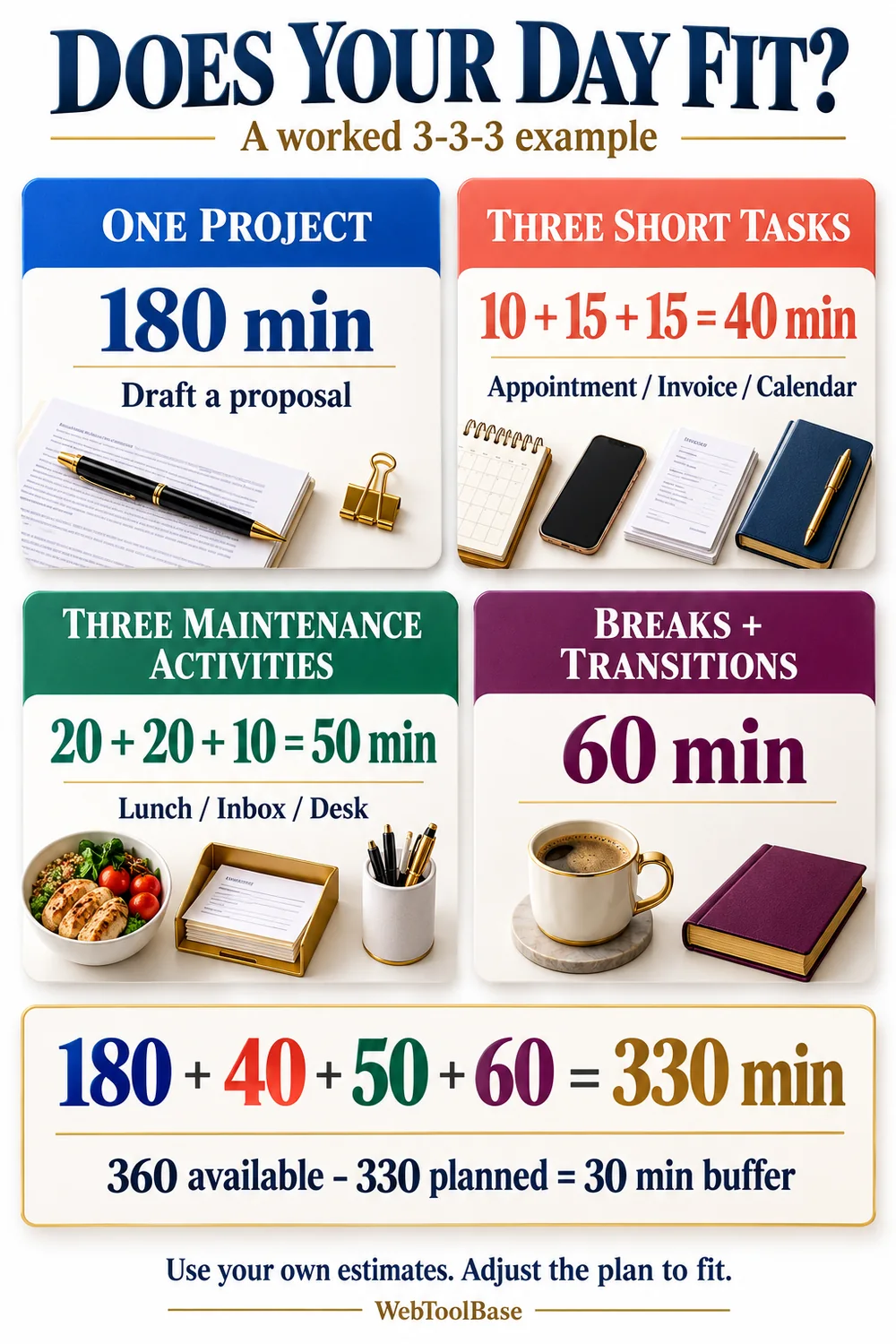
Decide where meals belong before doing the arithmetic. In the example below, lunch preparation is a maintenance activity. The separate sixty-minute allowance covers eating, breaks, and transitions without counting preparation twice. Your categories can differ; the important part is that every required minute is counted once.
| Part of the day | Specific work | Minutes |
|---|---|---|
| One project | Proposal outline and checked cost table | 180 |
| Three shorter tasks | Confirm appointment (10), send invoice (15), review calendar (15) | 40 |
| Three maintenance activities | Prepare lunch (20), triage inbox (20), clear desk (10) | 50 |
| Breaks and transitions | Eating, breaks, setup and changes between activities | 60 |
| Total planned | 180 + 40 + 50 + 60 | 330 |
| Available time and buffer | 360 available minus 330 planned | 30 left unassigned |
Now imagine an unexpected one-hour meeting reduces available time from 360 to 300 minutes. The unchanged 330-minute plan is over capacity by thirty minutes. You could shorten project work to 150 minutes, defer a nonessential activity, or renegotiate a deadline. Compressing the same work into the smaller window without changing anything is an assumption, not a solution.
A full example: turn “finish the proposal” into a usable plan
Consider a freelance designer who needs a client proposal ready for review later in the week. Today’s finish line is a three-section outline and a checked cost table, not the final polished document. The first action is to open the proposal file and type the section headings. That starting point makes the first session concrete without pretending the entire project is small.
For the project allocation, she reserves three sixty-minute work periods. The first organizes the brief and headings, the second drafts the scope and deliverables, and the third checks costs and marks unanswered questions. Breaks sit outside those 180 work minutes. These periods describe a possible arrangement, not an instruction to work for an hour without attending to your needs.
Her shorter tasks have distinct endpoints. Confirming the appointment ends when the confirmation is sent. Sending the invoice ends when the invoice and payment details have been checked and delivered. Calendar review ends when tomorrow’s commitments and travel needs have been noted. None requires clearing an entire inbox.
At the end of the available window, she records what exists: the outline is drafted, the table is checked, and two client questions remain open. Tomorrow’s first action is to send those questions. If the outline took longer than expected, the note also records why. That information makes the next estimate better than simply moving the same vague task to a new date.
Use the focus timer for a session, not for your whole day
A daily plan answers what deserves space. A countdown helps you keep track of one chosen work period. Set the session length to suit the next action and your needs, then decide what you will review when it ends. Twenty-five minutes is a familiar option, but this planner does not require that length or automatically run a sequence of work and break intervals.
Write a restart note before an interruption when you can: “Next, compare the second quote with the cost table.” Pause the timer if you want the remaining time to represent active work. If you leave it running, the elapsed time includes the interruption. Neither choice proves how much focused work occurred, so avoid treating the countdown as a performance score.
The WebToolBase timer has no sound, notification, or automatic wake-up. Its display follows the device clock, and changing that clock can affect the countdown. Use a separate alarm for appointments and other time-critical commitments. After a session, take the break you need and choose whether to continue, change scope, or stop.
3-3-3, Pomodoro and time blocking solve different planning problems
You can combine these approaches. First choose the day’s work with 3-3-3, reserve realistic space on the calendar, then use shorter focus sessions within a project period. The combination becomes unhelpful when maintaining the systems consumes more time than deciding what to do next.
| Approach | Main decision | Useful when | Watch for |
|---|---|---|---|
| 3-3-3 method | Which project, short obligations and maintenance belong today? | A long list mixes important progress with everyday upkeep. | Seven activity slots can still exceed the available day. |
| Pomodoro Technique | How will I work, pause, record effort and review estimates? | A bounded session makes the next action easier to approach. | A timer alone does not represent the full technique. |
| Time blocking | Where will work and commitments fit on a calendar? | Meetings, travel or shared availability constrain your schedule. | Back-to-back blocks can omit transitions and unexpected work. |
Francesco Cirillo’s official Pomodoro Technique site describes a broader system that includes planning, interruptions, breaks, effort records, and reflection. For a concrete study example, Oregon State University’s Academic Success Center describes twenty-five-minute work periods with short breaks and allows shorter periods. These are options to consider, not evidence that one interval suits everyone.
Adapt the method when your day has less room
A ninety-minute window
Try forty minutes on one project, two ten-minute shorter tasks, one ten-minute maintenance activity, and twenty minutes for breaks and transitions. The total is ninety minutes. This is a reduced version of the planning idea, not the original three-hour format. Leaving slots unused is better than creating six extra obligations to fill a template.
A day with caregiving or frequent interruptions
Choose a project slice that can be paused safely and keep the next action visible. A draft paragraph, a checked set of figures, or a short application section can have a useful endpoint. Put fixed care commitments into the time calculation before optional work. When interruptions are unpredictable, a small plan with generous spare time may be more honest than assigning every minute.
A low-capacity day or a day dominated by urgent work
Protect essential needs first. A reduced plan might contain one necessary maintenance task and one small administrative action, with no project target at all. If a genuine deadline consumes the day, say so in the plan and defer the optional categories deliberately. A method that requires ignoring your circumstances is not serving its purpose.
If you have ADHD or struggle to start
A visible finish line and a written first action can make the plan easier to follow, but the method is not an ADHD treatment and is not known to work for every person with ADHD. You do not need to force yourself through three hours to use its organizing idea. Change the session length, reduce the task count, and consider support that fits your circumstances.
When the difficulty is identifying a starting action, the Task Paralysis Breaker offers a separate place to break down the project. When the difficulty is leaving on time, the Time Blindness and Buffer Calculator works backward from a deadline. Those are different questions from allocating a day, so use the tool that matches the immediate problem.
Check these common traps before blaming your follow-through
| What happens | What to change |
|---|---|
| Three major projects occupy the first section. | Choose one project and define one outcome for today. |
| All six smaller activities are actually large projects. | Name a bounded next action and enter its full estimate. |
| The plan fits only by excluding meals and setup. | Account for those needs once, then reduce optional work. |
| An urgent request arrives and everything stays on the list. | Replace or defer something explicitly; recalculate available time. |
| The same unfinished task rolls forward each morning. | Check for missing information, an unclear endpoint or an estimate that needs revision. |
A useful end-of-day review can be brief. Record what you actually produced, where the estimates were off, and what the next action is. Distinguish an interrupted day from a badly estimated task. That distinction helps you adjust the right part of the plan without turning an unfinished checkbox into a judgment about yourself.
Saving and downloading your browser plan
Browser saving starts switched off. Enable it only when you want the current device to retain the plan and timer. Entries saved on a shared device may be visible to its other users. Storage can be lost when browser data is cleared, and the tool does not sync across devices. Download a text copy if you need a portable record.
A saved running timer restores using its recorded end time. If that end time passed while the page was closed, the countdown finishes when the page is reopened; it does not send an alert while the browser is closed. Turning browser saving off removes the saved copy while keeping your current visible entries. Clear plan and saved copy resets both the plan and timer.
Prefer writing on reusable pages? The WebToolBase digital planner shop offers a separate notebook-style option. You can use the free browser planner without buying a product. Choose the format that you will comfortably revisit when the day changes.
Questions people ask about the 3-3-3 productivity method
Does 3-3-3 mean three priorities?
In the version discussed here, the first three means three hours on one important project. The other numbers refer to three shorter tasks and three maintenance activities. A three-priority list is a different format and can be useful in its own right, but it is not this particular structure.
Do I have to work for three hours without a break?
No. Keep breaks and transitions visible in the plan, and divide the project allocation into work periods that fit your needs. A three-hour target can be reduced when available time or capacity is lower. The number is not a test of attention, discipline or health.
What if I cannot finish all seven activities?
Review scope, estimates, interruptions and dependencies before carrying everything forward. Decide what still matters tomorrow and what can be deferred or dropped. Completing every slot is not required to learn something useful about your planning.
Is there evidence that this method outperforms every other approach?
The sources used here do not establish that claim. Treat 3-3-3 as an optional planning structure. Try a small version, observe whether it helps you make realistic choices, and keep only the parts that serve your work and daily life.
Begin with one project outcome, then count the real minutes around it. The 3-3-3 daily planner can check the arithmetic. Your final decision is what to keep, shrink, defer or leave unassigned.